Field Guide · rev 1.0 · offline

Learn to 3D print,
one layer at a time.

Hey Max — this is your bench manual for turning a spool of plastic into real objects. No fluff, no logins, no internet required. Just the stuff that actually helps you get a clean first print.
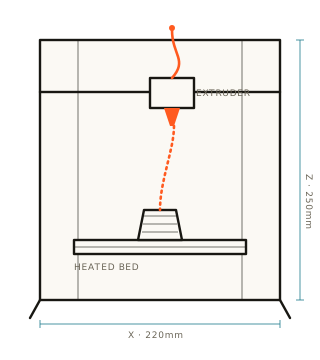
Schematic diagram of a cartesian 3D printer mid-print FIG. 01 — CARTESIAN FDM
0.20mm
First layer height
200°C
PLA nozzle temp
04
How-to guides
06
Prints in the gallery
The basics

So, what is 3D printing?

§ 00 / OVERVIEW

A 3D printer builds objects from the bottom up by laying down melted plastic in thin layers — usually about a fifth of a millimetre thick — and stacking hundreds or thousands of them until a shape appears.

The most common kind, and the one this guide is about, is called FDM — Fused Deposition Modeling. A motor pushes a plastic string (filament) into a hot metal nozzle. The nozzle melts it and draws each layer like a tiny hot glue pen on rails. You design or download a model, a program called a slicer chops it into layers, and the printer follows those instructions one line at a time.

Where to go next

Three ways in

§ 01 / NAVIGATE
01 — GUIDES

How-to from zero

Getting started, slicer settings, filament types, and a troubleshooting table for when prints go wrong.

Read the guides
02 — GALLERY

Prints to try

Six classic models — from the famous calibration boat to an articulated dragon — with their print specs.

Browse prints
03 — RESOURCES

Where to find more

Model libraries, slicers, communities, and a plain-language glossary of every term you'll bump into.

Open resources
Pre-flight

Your first-print checklist

§ 02 / CHECKLIST
STEP 01

Level the bed

The nozzle should be one sheet of paper away from the plate, everywhere. This single thing fixes most failures.

STEP 02

Load filament

Heat the nozzle to ~200 °C for PLA, feed the spool until plastic oozes out clean.

STEP 03

Slice a model

Drop a .stl into your slicer, pick "0.2 mm standard", and export the .gcode.

STEP 04

Watch layer one

Stay for the first layer. If it sticks flat and even, the rest almost always works out.

Bench note

Don't chase a perfect print on day one. Chase a finished one. A slightly ugly object that came off the bed in one piece teaches you more than a fancy model that failed at layer 3.