01What you'll build
The goal: the onboard LED blinks out a word — short flashes for dots, long flashes for dashes — pauses between letters, then loops forever. No breadboard, no resistors, no wires. The light you need is already on the board.
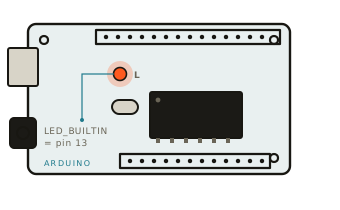
It's wired to a pin the code calls LED_BUILTIN (pin 13 on an Uno). Because it's already
connected, it's the perfect "hello world" for electronics — if your code works, the light blinks.
02What you need
- An Arduino board — an Uno, Nano, or most clones all work
- A USB cable to connect it to your computer
- The free Arduino IDE (download from arduino.cc/software)
That's the whole list. No parts to buy, nothing to plug in.
03How Morse timing works
Morse code is built from just two signals — a dot (short) and a dash (long) — plus carefully sized gaps. Everything is measured in one "unit" of time. Pick a unit (say, a quarter-second) and every other length is a multiple of it:
| Signal | Length | What it is |
|---|---|---|
| Dot · | 1 unit ON | The short flash |
| Dash — | 3 units ON | The long flash |
| Symbol gap | 1 unit OFF | Between dots/dashes in a letter |
| Letter gap | 3 units OFF | Between letters |
| Word gap | 7 units OFF | Between words |
So SOS — the famous distress call — is ... --- ...: three dots, three
dashes, three dots. The code below follows exactly these ratios.
04The sketch
Here's the whole program. It reads your message one character at a time, looks up each letter's dot-dash pattern, and flashes the LED with the right timing. Copy all of it:
// ── Morse code blinker ───────────────────────────────
// Flashes a message on the Arduino's built-in LED.
// No wiring needed — LED_BUILTIN is the little "L" LED
// already soldered to the board (pin 13 on an Uno).

const int LED = LED_BUILTIN;

// Timing — everything is built from one "unit".
// Bigger UNIT = slower blinking, easier to read.
const int UNIT       = 250;        // a dot, in milliseconds
const int DOT        = UNIT;       // dot  : 1 unit ON
const int DASH       = UNIT * 3;   // dash : 3 units ON
const int GAP_SYMBOL = UNIT;       // between dots/dashes : 1 unit
const int GAP_LETTER = UNIT * 3;   // between letters     : 3 units
const int GAP_WORD   = UNIT * 7;   // between words       : 7 units

// The message to send. Use CAPITAL letters and spaces.
const char* message = "HELLO MAX";

void setup() {
  pinMode(LED, OUTPUT);             // the LED pin is an output
}

void loop() {
  for (int i = 0; message[i] != '\0'; i++) {
    char c = message[i];
    if (c == ' ') {
      delay(GAP_WORD);               // a space = gap between words
    } else {
      sendChar(c);
      delay(GAP_LETTER);             // pause after each letter
    }
  }
  delay(3000);                       // wait, then repeat forever
}

// Flash the dots and dashes for one character.
void sendChar(char c) {
  const char* code = morse(c);
  for (int i = 0; code[i] != '\0'; i++) {
    digitalWrite(LED, HIGH);
    delay(code[i] == '.' ? DOT : DASH);
    digitalWrite(LED, LOW);
    delay(GAP_SYMBOL);               // short gap between symbols
  }
}

// Return the Morse pattern for a letter or number.
const char* morse(char c) {
  switch (toupper(c)) {
    case 'A': return ".-";     case 'B': return "-...";
    case 'C': return "-.-.";   case 'D': return "-..";
    case 'E': return ".";      case 'F': return "..-.";
    case 'G': return "--.";    case 'H': return "....";
    case 'I': return "..";     case 'J': return ".---";
    case 'K': return "-.-";    case 'L': return ".-..";
    case 'M': return "--";     case 'N': return "-.";
    case 'O': return "---";    case 'P': return ".--.";
    case 'Q': return "--.-";   case 'R': return ".-.";
    case 'S': return "...";    case 'T': return "-";
    case 'U': return "..-";    case 'V': return "...-";
    case 'W': return ".--";    case 'X': return "-..-";
    case 'Y': return "-.--";   case 'Z': return "--..";
    case '0': return "-----";  case '1': return ".----";
    case '2': return "..---";  case '3': return "...--";
    case '4': return "....-";  case '5': return ".....";
    case '6': return "-....";  case '7': return "--...";
    case '8': return "---..";  case '9': return "----.";
    default:  return "";        // unknown character → stays silent
  }
}loop() walks the message letter by letter. For each letter it calls
sendChar(), which looks up the dots and dashes in morse() and flashes them.
Spaces become a long word-gap. When the message ends, it waits three seconds and starts over.
05Upload it
- Plug the Arduino into your computer with the USB cable.
- Open the Arduino IDE and paste the whole sketch into a new window.
- Pick your board under
Tools → Board(e.g. "Arduino Uno"). - Pick the right
Tools → Port(the one that appears when you plug it in). - Click the Upload button (the round arrow → ).
- Watch the little
LLED. It should start spelling HELLO MAX.
Double-check the Board and Port are both selected. If upload fails,
unplug and replug the cable, then try again. A few boards (some ESP32s) put the built-in LED on a
different pin — if yours stays dark, try changing LED_BUILTIN to 2.
06Make it your own
- Change the message: edit the
"HELLO MAX"line. Capitals, numbers, and spaces all work. - Change the speed: raise or lower
UNIT. Try400to slow it right down while you learn to read it, or120once you're quick. - Try a classic: set the message to
"SOS"and watch the rhythm: dot-dot-dot, dash-dash-dash, dot-dot-dot.
Morse alphabet reference
Decode the flashes — or write your own message — with this chart: