01Active vs passive
There are two kinds of small buzzer, and they look almost identical. Getting the right one matters:
| Type | What it does | How you drive it |
|---|---|---|
| Active | Has a built-in tone generator. One fixed pitch. | Just turn the pin HIGH — it beeps |
| Passive | No tone generator. You feed it the pitch. | Needs tone() / a changing signal |
This guide is for the active one. Two easy ways to spot it: it usually has a sticker on top and is a little taller, and it often has a + marked by one leg. If you flip it over and see a green circuit board with a copper coil, that's a passive buzzer — set it aside for now.
Active = on/off beeps (this guide). Passive = melodies, but you have to generate every note in code.
02What you need
- An active buzzer (the one with the sticker /
+mark) - An Arduino Uno + USB cable
- 2 jumper wires (male-to-female if you're plugging straight into the buzzer's legs)
- For the last example only: a pushbutton + 2 more wires
03Wiring it up
Just two wires. The buzzer has a long leg (+) and a short leg (−), exactly like an LED:
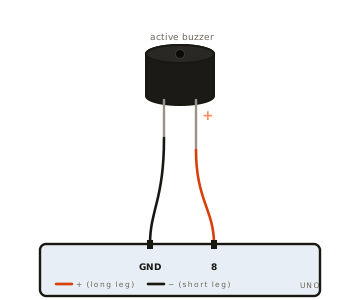
| Buzzer leg | Wire to Arduino |
|---|---|
| + (long leg) | pin 8 |
| − (short leg) | GND |
A small active buzzer sips about 25–30 mA, which an Arduino pin can supply directly. If you ever use a big, loud buzzer, drive it through a transistor instead so you don't overload the pin — but for the little ones, straight to the pin is fine.
04Make it beep
Here's the whole idea: HIGH = beep, LOW = silence. This makes a short beep
once a second:
const int BUZZER = 8;

void setup() {
  pinMode(BUZZER, OUTPUT);
}

void loop() {
  digitalWrite(BUZZER, HIGH);   // beep
  delay(200);                   // ...for 0.2 seconds
  digitalWrite(BUZZER, LOW);    // silence
  delay(800);                   // ...for 0.8 seconds, then repeat
}
That's genuinely all there is to an active buzzer. Everything else is just patterns of beeps and silences.
05SOS alarm
Same trick, more interesting timing. SOS in Morse code is three short beeps, three
long beeps, three short beeps — ··· ——— ···. It uses the exact same timing rules as the
LED Morse page, just sent to your ears instead of your eyes:
const int BUZZER = 8;

// Timing, all based on one "unit" (a dot length).
const int UNIT = 200;
const int DOT  = UNIT;          // short beep : 1 unit
const int DASH = UNIT * 3;      // long beep  : 3 units
const int GAP_SYMBOL = UNIT;     // silence between beeps
const int GAP_LETTER = UNIT * 3; // silence between letters

void setup() {
  pinMode(BUZZER, OUTPUT);
}

// One beep of a given length, then a short gap.
void beep(int ms) {
  digitalWrite(BUZZER, HIGH);
  delay(ms);
  digitalWrite(BUZZER, LOW);
  delay(GAP_SYMBOL);
}

void loop() {
  beep(DOT);  beep(DOT);  beep(DOT);    // S = ...
  delay(GAP_LETTER);
  beep(DASH); beep(DASH); beep(DASH);   // O = ---
  delay(GAP_LETTER);
  beep(DOT);  beep(DOT);  beep(DOT);    // S = ...
  delay(2000);                          // pause, then repeat
}
Want a faster or slower alarm? Change UNIT. Want a different message? Beep out any letters
using the chart on the Morse page.
06Button-triggered beep
Now let's make it beep only when you say so. Add a pushbutton between pin 2 and GND — no resistor needed, because we'll use the Arduino's built-in one:
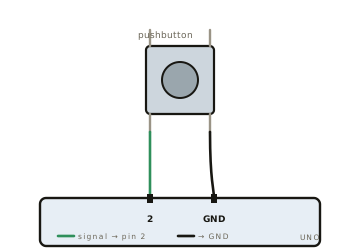
| Button leg | Wire to Arduino |
|---|---|
| One leg | pin 2 |
| Diagonally opposite leg | GND |
The buzzer stays exactly where it was (+ on pin 8, − on GND). Then:
const int BUZZER = 8;
const int BUTTON = 2;

void setup() {
  pinMode(BUZZER, OUTPUT);
  pinMode(BUTTON, INPUT_PULLUP);   // built-in resistor; not pressed = HIGH
}

void loop() {
  if (digitalRead(BUTTON) == LOW) {  // pressed pulls the pin LOW
    digitalWrite(BUZZER, HIGH);      // beep while held
  } else {
    digitalWrite(BUZZER, LOW);       // silent when released
  }
}A floating input pin reads random noise. INPUT_PULLUP switches on a tiny resistor inside
the Arduino that holds the pin HIGH by default, so a press cleanly reads LOW.
It saves you wiring a separate resistor — that's why the button only needs two wires.
07If it won't beep
| What you hear | Usually means | Try this |
|---|---|---|
| Total silence | Legs swapped, or wrong pin | + (long leg) → pin 8, − (short) → GND |
| Only a faint tick | It's a passive buzzer | Active beeps on HIGH; passive needs tone() |
| Very quiet beep | Protective sticker still on | Peel the sticker off the top |
| Beeps non-stop (button build) | Button legs wired on the same side | Use two diagonally opposite legs |
| Nothing on button press | Missing INPUT_PULLUP | Check pin 2's mode in setup() |